

Power Supply Nemesis Kwadron Red
KwadronSpecifications
- Brand
- Kwadron
- Material
- Aluminum
- Dimensions
- 80x70x35mm
- Voltage
- 0-20V
- Motor power
- 24W
- Weight
- Light
- Warranty
- 1 year
- Color
- Red
Useful guides:Sursa de alimentare pentru tatuaj — ghid pe înțelesSursă de tatuaj digitală vs analogică: ecran, dual output și conectoriLa ce voltaj se tatuează: linii, umbre, umplere — tabel complet
Presentation video
Guide & full description
Complete guide: Power Supply Nemesis Kwadron Red
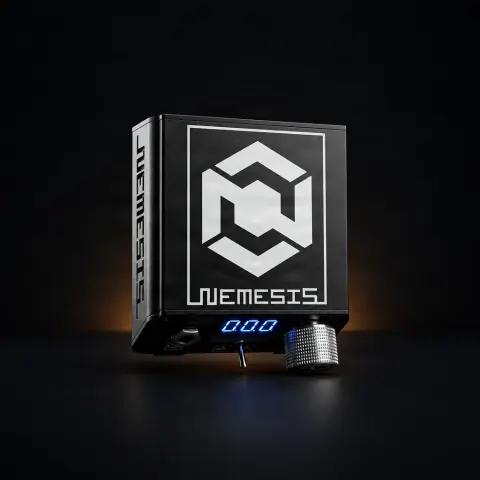
This is a professional power supply for tattoo machines, in the red color variant, built from a single piece of CNC-machined aluminum. You adjust the output voltage using a 10-turn potentiometer, precise to 0.1 V, and read it on the three-digit LED display — meaning you can return exactly to the same working value, session after session. The manufacturer's datasheet recommends it for both coil and rotary machines. With dimensions of 80 x 70 x 35 mm and a separate power adapter, it is equally suitable on the studio table as in a convention bag.
How to use
- Place it on a stable, dry surface, away from the wet area of the work table, and connect the included external adapter (the one dedicated to the model) to the mains.
- Connect the tattoo machine to the output jack using the appropriate clip cord — the unit's connectors are of the large jack type, so check from the start that your cable has the corresponding end.
- If you work with a foot pedal, connect it now; if you prefer to work without one, use the manual switch on the unit, which allows you to start and stop without using your foot.
- Before the session, cover the power supply, cables, and pedal with protective barriers (plastic wrap or disposable covers), because you will touch them with gloves during work.
- Start with the voltage turned down to minimum and gradually increase it using the potentiometer, watching the value on the LED display. Being a 10-turn potentiometer, it requires several full rotations to cover the entire range — this gives it the 0.1 V precision.
- Adjust until the machine works as you desire, respecting the voltage range recommended by the machine manufacturer for the needle configuration used.
- Test on artificial skin before touching the client and note the voltage found, so you can set it identically next time.
- At the end, lower the voltage, turn off the unit, unplug the adapter from the mains, remove the barriers, and disinfect the external surfaces.
Tips from us
- Keep a small table (on paper or in your phone) with the working voltage for each machine and each type of needle configuration — with the LED display and 0.1 V adjustment, the values are truly reproducible.
- Don't be alarmed if you have to turn the knob a lot: the 10-turn potentiometer is designed exactly for this, so that fine adjustment is easy to hit.
- Use only the adapter supplied with the product. It is dedicated to this model, and replacing it with any random power supply is the most common cause of problems with any tattoo power supply.
- Periodically check the condition of the cables and jack connectors: most 'power supply failures' are actually a worn-out clip cord at the end, not a defect of the power supply. Do not bend the cable sharply right next to the connector.
- The one-piece CNC housing is made to be taken to conventions and guest spots — but always take the external adapter with you, otherwise the unit remains unusable.
- The maximum available current is 3 A; make sure the machine you connect falls within this limit, according to its specifications.
Frequently asked questions
What voltage and current can it output?▾
The output is direct current, adjustable up to 20 V, with a maximum current of 3 A. The product datasheet indicates the adjustment range as "0-20 V" and "2:20 V c.c.". Power comes from the included external adapter, 24 V c.c. Adjustment is done with a 10-turn potentiometer, precise to 0.1 V, and you read the value on the three-digit LED display.
Will it work with my machine? Is it for rotary or coil?▾
The manufacturer describes it as suitable for working with both coil machines and rotary machines. The thing to check before ordering is the cable: the input/output connectors of the unit are of the large jack type, so make sure you have the clip cord with the appropriate termination for your machine. As a general rule, the working voltage differs from one machine to another — start from the machine manufacturer's recommendation, not from a "standard" value heard from someone else.
Can I work without a foot pedal?▾
Yes. In addition to the pedal control, the unit has a manual switch that allows you to start and stop the machine without using your foot. It is especially useful for short sessions, working on areas where the body position is uncomfortable, or when you want to reduce the number of cables on the floor.
How do I properly sanitize it between clients?▾
The simplest and safest way is to cover it with a protective barrier (disposable plastic wrap) before the session and change the barrier for each client — you touch the button with gloves during work, so the surface gets contaminated. At the end, remove the barrier, disconnect from the mains, and wipe the housing with a surface disinfectant wipe. Do not spray disinfectant directly onto the device and do not wet it in the area of the connectors.
What do I get in the package?▾
The product datasheet explicitly states that the external power supply (adapter) dedicated to this model is included. For the rest of the accessories you need to work — clip cord and foot pedal — check the description and listing on the product page or ask us before ordering, so you don't end up stuck with a cable that doesn't fit.
Why do I have to turn the knob so much to change the voltage?▾
It is not a defect, but exactly the reason why such a device is worth it. The potentiometer has 10 turns, meaning it covers the entire adjustment range in ten complete rotations, not just one. The result is that you can adjust the voltage in steps of 0.1 V and can return exactly to the value you like, instead of „hunting” for the right point with a small finger movement.
Product description
👁1 person viewed it this week
You might also like
Reviews
No reviews yet. Bought this product? Be the first to leave one.