Complete guide: A4 UNISTAR transfer sheet for printer
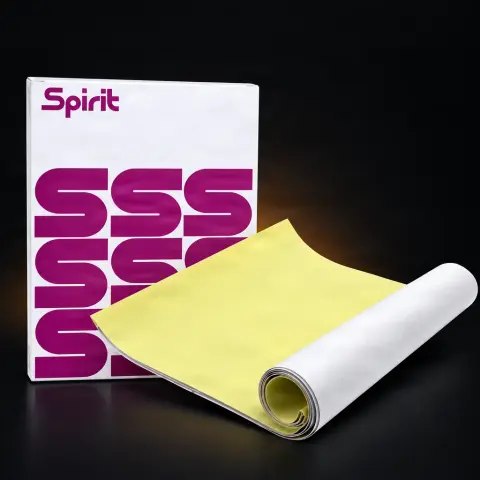
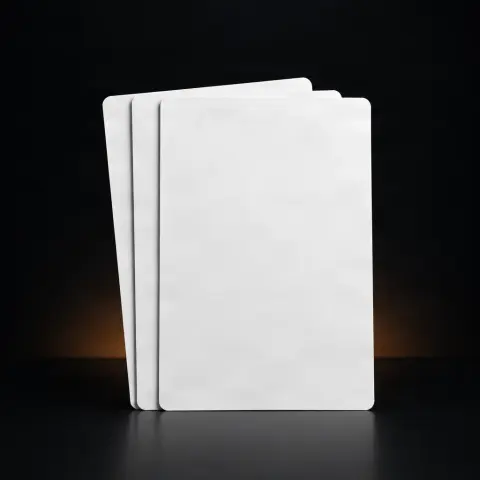
The UNISTAR A4 transfer sheet is a stencil paper designed for preparing tattoo designs before working on the skin. Print your desired design on its special side, then transfer the outline onto the prepared client area, providing a clear line guide for the session. It is a basic consumable for any studio — one sheet typically corresponds to one stencil — useful both for artists with high client volume needing consistency and for beginners who want to avoid manual drawing directly on the skin.
How to use
- Prepare the digital file with the tattoo design at the desired size and orientation.
- Print the design on the special side of the sheet using a stencil transfer printer/copier; if unsure which type of printer you need, check compatibility with your device before ordering.
- Clean and prepare the client's skin (remove hair, disinfect, dry the area completely).
- Apply a dedicated transfer solution or gel to the skin in an even layer over the entire area where the sheet will be placed.
- Place the sheet with the printed side directly on the skin and press evenly without moving or sliding it on the surface.
- Maintain pressure for a few seconds, then lift the sheet carefully from one corner to check if the transfer is complete.
- Inspect the resulting stencil; if there are unclear or broken areas, repeat the process with a new sheet.
- Once the transfer is confirmed, discard the used sheet — do not reuse — and proceed with the tattoo session.
Tips from us
- As a consumable product, one sheet corresponds to a single transfer — keep a few spare sheets handy for possible corrections or duplicate stencils.
- Do a test print on a regular sheet first to see if the design lines come out sufficiently clear with your printer settings.
- A4 format: for large designs, you can split the design across multiple sheets or resize the composition before printing.
- Store unused sheets in a dry place away from moisture, heat, and direct light to prevent the transfer layer from degrading.
- Handle sheets with clean hands (or gloves) before application to prevent the transfer face from being contaminated with oil or dirt.
- Apply even pressure during transfer — uneven pressing can leave parts of the design incomplete on the skin.
Warning: Each sheet is intended for single use on one client — do not reuse, even if the transfer was partial. A sheet that has come into contact with skin must be discarded following studio hygiene rules. Work with clean hands or gloves both when handling the sheet and applying the transfer solution, and avoid contact of the solution with the client's eyes or mucous membranes.
Frequently asked questions
Which printer is the UNISTAR transfer sheet compatible with?▾
The sheet is designed to be used with a printer/copier dedicated to tattoo stencil transfer. Since transfer paper types vary from one machine model to another, we recommend confirming the exact compatibility with the printer you already use in the studio when ordering (or with us, before purchase) to avoid surprises on the first transfer.
How do I apply the stencil correctly on the skin?▾
In short: print the design on the special side of the sheet, prepare the skin (clean, possibly shave, dry), apply a transfer solution/gel to the area, press the sheet evenly for a few seconds, and lift it carefully from one corner. If the transfer is incomplete, repeat with a new sheet — see the detailed steps above.
Can a sheet be reused for multiple clients?▾
No. The sheet is a single-use consumable — once applied to the skin, it is discarded. Reusing is not a safe hygienic practice, and anyway, the quality of a second transfer from the same sheet drops considerably.
How long does the stencil last on the skin after transfer?▾
It depends on the transfer solution used, skin type, and working conditions, but generally, a properly applied stencil lasts through a tattoo session. If you are working on a piece that spans several hours, a quality transfer solution helps maintain line clarity throughout the session.
What size is the sheet and how is the price calculated?▾
The sheet is standard A4 format, sufficient for most small and medium designs; for large pieces, you can split the design across multiple sheets. The price shown is per sheet (single sheet), not per pack.
Product description
The Unistar Thermal Copier transfer sheet is perfect to reflect your design and to be used with the thermal printer. Perfect for creating extremely accurate and precise prints that look great on the client's skin, capturing every detail and allowing the tattoo artist to work comfortably on their design. Compatible with most thermal printers on the market. Due to the use of an appropriate high-quality transfer layer, the tracing paper is very sensitive to pressure, which guarantees the accuracy of the reflection on the skin of even the most detailed models. The high-quality indigo, once reflected, remains on the skin for a long time and is resistant to abrasion, making it easy to work on the tattoo even during long sessions. The price is for one sheet
The UNISTAR A4 Transfer Paper for printers is the professional solution for precise tattoo design transfers onto skin. Manufactured from high-quality materials, this transfer sheet enables faithful reproduction of any design, delivering the clear lines and fine details essential for professional studio work. Compatible with both inkjet and laser printers, UNISTAR transfer paper eliminates the need for hand-drawing stencils, saving valuable time in a busy artist's schedule. The standard A4 format provides generous space for designs of varying sizes, from small delicate pieces to medium-scale work. UNISTAR transfer paper stands out for its ability to retain the optimal amount of ink, ensuring a complete and uniform transfer onto skin. Unlike cheap alternatives that can produce broken lines or lost details, UNISTAR guarantees exact reproduction of every element in your design. The application process is straightforward: print your design on the specially coated side, apply to skin prepared with transfer solution, and achieve a perfect stencil in seconds. This sheet is ideal for artists working with high client volumes who require maximum consistency. Universal compatibility with most standard office printers makes UNISTAR a practical and accessible choice. Used in professional studios worldwide, this transfer paper represents the industry standard for preparing high-quality tattoo stencils.
Frequently Asked Questions What types of printers is the UNISTAR A4 transfer paper compatible with? The UNISTAR A4 transfer paper is compatible with both inkjet and laser printers. It works optimally with most standard office printers without requiring special settings. It is recommended to use your printer's high-quality setting to achieve the clearest and most detailed results. Make sure to use the correct side of the sheet for printing. How do you correctly apply the transfer paper to skin? For correct application, first print your design on the specially coated side of the transfer sheet. Prepare the skin area by cleaning it and applying a dedicated transfer solution or gel. Place the sheet with the printed side against the skin, press evenly, and hold for several seconds. Slowly lift the sheet to verify the complete transfer of the design. What is the difference between UNISTAR and other transfer papers? UNISTAR paper distinguishes itself through the superior quality of its coating layer that retains the optimal amount of ink. This ensures continuous lines and fine details without breaks, unlike cheap alternatives that can produce incomplete transfers. The premium material guarantees faithful design transfer, including the most subtle elements of the drawing. Can I use UNISTAR transfer paper for color designs? UNISTAR transfer paper is primarily optimized for monochrome transfers, which are the standard in the tattoo industry for creating stencils. Black or dark purple lines provide the best contrast on skin. While it can reproduce certain shades, for professional stencils it is recommended to use black and white designs for maximum clarity. How long does the stencil last on skin after transfer? The stencil's duration on skin depends on several factors, including the type of transfer solution used, skin type, and working conditions. Generally, a properly applied stencil using UNISTAR can last throughout a complete tattoo session, from several hours to a full day. Using a quality transfer solution extends the stencil's duration. Is UNISTAR transfer paper safe for skin? Yes, UNISTAR transfer paper is manufactured from safe materials that do not have prolonged direct contact with skin. The ink transferred onto skin is non-toxic and biocompatible, specifically designed for use in the tattoo industry. The product complies with industry safety standards and is used in professional studios worldwide. What print resolution is recommended for best results? For optimal results with UNISTAR paper, a minimum print resolution of 300 DPI is recommended. This ensures all fine details of the design are reproduced with clarity. High-quality printer settings provide the best results. For designs with very fine details, a 600 DPI resolution will deliver even greater precision. How should UNISTAR transfer papers be stored? UNISTAR transfer papers should be stored in a dry location, away from direct sunlight and excessive humidity. Keeping them in the original packaging or a sealed envelope is ideal for maintaining quality. The recommended storage temperature is between 15 and 25 degrees Celsius. Avoid bending or damaging the transfer surface. Can the transfer paper be cut to smaller sizes? Yes, the UNISTAR A4 transfer paper can be cut to any desired size before printing. This allows material savings for smaller designs and efficient use of each sheet. Ensure the cut sheet meets the minimum dimensions accepted by your printer for proper feeding. Cutting should be done with scissors or a cutter on a flat surface. How many transfer sheets are needed for a tattoo session? The number of sheets needed depends on the project's complexity and the number of positioning attempts. Generally, preparing at least 2-3 sheets per design is recommended: one for the main transfer and 1-2 backups in case of repositioning. For sessions with multiple clients, calculate approximately 3 sheets per client to have sufficient material.