POLARIZED LENS FOR TATTOO PHOTOGRAPHY 52MM
Specifications
- Material
- Plastic with glass
- Dimensions
- 5.2mm x 1cm
- Color
- Black
- Usage
- Tattoo photography
- Compatibility
- Clip-on
Ghiduri utile:Mobilier și lampă de studio pentru tatuajScaunul de tatuat: cum îl alegi pe cel potrivit pentru studioErgonomia la tatuat: scaun, taburet și braț de lucru fără dureri de spate
Presentation video
Guide & full description
Complete guide: POLARIZED LENS FOR TATTOO PHOTOGRAPHY 52MM
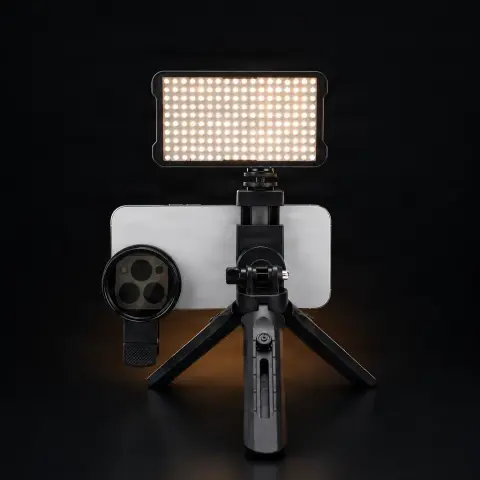
The 52 mm polarized lens is a clip-on optical filter that attaches directly to your phone's camera and reduces reflections and shine on the skin when photographing a tattoo. It is especially useful for artists and studios who want to capture the work clearly, without the light spots that often appear in photos taken only with the phone, especially on freshly tattooed or glossy skin. Being detachable, it mounts and removes quickly, so it can be used as needed, even at the end of a tattoo session.
How to use
- Position the lens clip on your phone's camera, centering the glass part exactly over the lens.
- Secure the clip firmly so that the lens stays straight and stable in front of the camera, without moving during the shot.
- Open your phone's camera app and watch the image on the screen in real time.
- Gently rotate the lens until reflections and shine on the skin or on the wrap are visibly reduced in the frame.
- Let the phone a few seconds to automatically readjust the exposure, as the filter reduces the amount of light reaching the sensor.
- Photograph the tattoo from multiple angles, each time checking the clarity and any overexposed areas on the screen.
- Detach the lens after the photo session and keep it protected from dust, scratches, and impacts.
Tips from us
- The polarizing effect is best seen in strong or direct light (bulb, flash, window), where reflections on the skin are more pronounced.
- Wipe the lens with a soft microfiber cloth before each session so that dust or fingerprints do not appear in the photos.
- Test the shooting angle before the 'official' photo session — freshly tattooed skin has a different shine compared to healed skin, and the optimal angle may vary.
- Avoid any direct contact of the lens or clip with the tattooed area, so as not to dirty the optics and not to touch the sensitive skin.
- Store the lens in a pouch or small case when not in use, as the plastic frame can get scratched.
Frequently asked questions
Does it fit any phone?▾
The lens has a clip-on design with a universal clip, designed to attach to the phone's camera regardless of model. The actual lens diameter is 52 mm; what matters is that the camera position on your phone allows the clip to cover it properly when mounted.
How do I clean it without scratching it?▾
Wipe the glass part only with a soft microfiber cloth, dry or slightly dampened with water. Avoid rough tissues, toilet paper, or concentrated alcohol solutions, which can affect the lens clarity over time.
Why do I need a polarized lens if I already have a good camera on my phone?▾
Phone cameras, no matter how good, do not have a built-in polarizing filter. Light reflected from the skin, especially freshly tattooed and glossy, often appears as overexposed white spots in photos. The filter reduces these reflections directly at capture, without needing later retouching.
Can it be used for something else, not just for tattoos?▾
Yes. The principle of a clip-on polarizing filter is generally valid in mobile photography: it reduces reflections on any glossy surface — glass, water, skin — so it can also be used for other types of product or portrait photos.
Does it need a battery or special settings in the photo app?▾
No. It is a purely optical accessory, with no electronic components, mechanically mounted on the camera. It works simply by light passing through the lens, without any synchronization with the phone or camera app.
Product description
You might also like
Reviews
No reviews yet. Bought this product? Be the first to leave one.