Complete guide: Power Supply Hummingbird Bronc M2
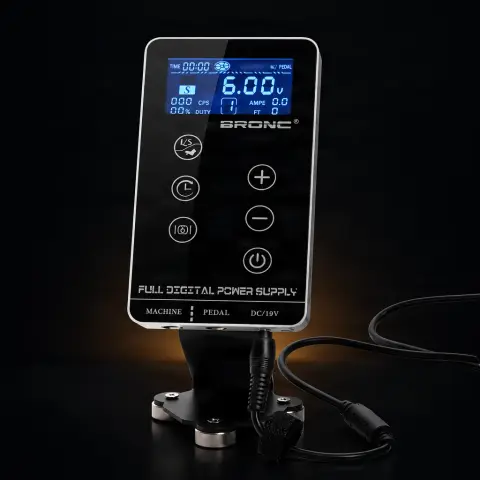
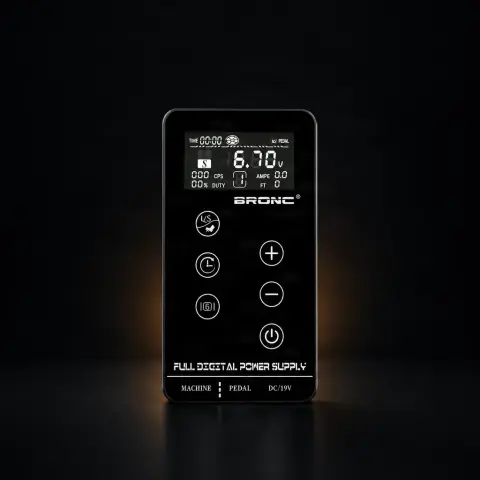
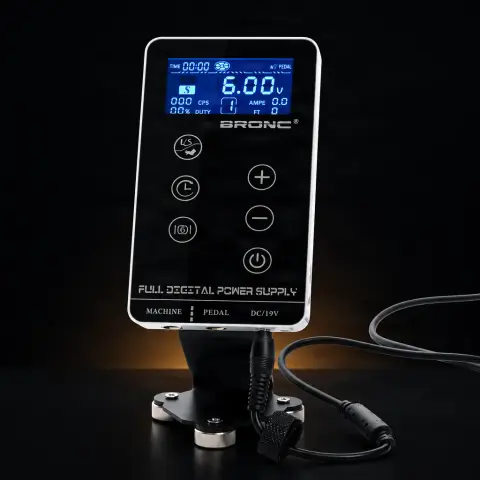
This is a professional digital power supply for tattoo machines, from the Hummingbird Bronc series. Its role is simple but essential: it delivers stable and adjustable output voltage to the machine, with precise control via buttons and display. It is aimed at artists who want a clear control panel with presets and an integrated timer, and it connects to most modern machines via clipcord/RCA.
How to use
- Place the power supply on a stable, clean surface near the work area, plug it in, and turn it on.
- Connect the tattoo machine to the power supply via the clipcord or RCA cable; if you prefer foot control, also connect the footswitch to the dedicated socket.
- Adjust the output voltage with the up/down arrows to the appropriate value for your machine and technique.
- Save and use presets: with the three-step voltage memory, you can quickly switch between settings by pressing the left/right arrows.
- Choose, according to preference, between the intelligent interface and the simple interface, which can be switched freely.
- For continuous operation without a pedal, use the Start/Stop button; otherwise, control starting via the pedal.
- If you want to track your working time, activate the timer: in 'Session Time' mode, you manually time from the clock button, and in 'Run Time' mode, time runs only while the machine is running.
- At the end, turn off the power supply, unplug it, and wipe the housing before storing it.
Tips from us
- Cover the power supply with barrier film and put a sleeve on the clipcord during the session to keep it clean and easy to sanitize between clients.
- Configure your presets for different situations (e.g., lining vs. shading) and switch between them using the arrows, so you don't have to adjust the voltage each time.
- Start at a lower voltage and gradually increase it until you feel the machine's proper cadence, rather than starting high.
- Note down the voltages that work well for each machine you use; you'll set up your power supply much faster next time.
- Keep cables neatly arranged to avoid pulling or stepping on them during work and to prevent premature wear of the connectors.
Warning: As it is an electrical device, do not spray it directly with disinfectant or submerge it in liquid. Clean it with the device turned off and unplugged, wiping the housing with a cloth only slightly dampened with surface disinfectant. During use, use barrier film and a sleeve on the clipcord to prevent contamination. Periodically check the cables and connectors; if you notice worn insulation or loose connectors, stop using that cable.
Frequently asked questions
Do I absolutely need a pedal to use it?▾
Not necessarily. The power supply has a Start/Stop button that puts the machine into continuous operation without pressing the pedal, which is useful for certain techniques. However, you can connect a footswitch to the dedicated socket if you prefer classic foot control.
Which tattoo machines is it compatible with?▾
It connects via clipcord/RCA, the universal standard for tattoo power supplies, so it works with most modern machines — rotary, pen, and coil — that use these connectors. Just check what connector type your machine's cable uses (some pens use RCA, others clipcord) and choose the corresponding cable.
What's the difference from Model 1 of the Bronc series?▾
The manufacturer presents Model 2 as a design and ergonomics update of the Bronc series, with a different casing and button/display layout compared to Model 1. The choice between them mainly depends on your personal preference for a particular control panel format; we recommend comparing the two versions and choosing the one that feels more intuitive to you.
Can I save multiple voltage settings?▾
Yes. The power supply has three-step voltage memory: you adjust the value with the up/down arrows, and with the left/right arrows you quickly switch between presets. This is practical for moving between different settings (e.g., lining and shading) without manually adjusting each time.
What is the timer used for?▾
It shows how long you've been working. In 'Session Time' mode, you start, stop, and resume timing from the clock button, and pressing and holding the button for a few seconds resets the counter; in 'Run Time' mode, time is counted only while the machine is actually running. It's useful for estimating a session's duration.
How do I clean and maintain it properly?▾
During use, cover it with barrier film and put a sleeve on the clipcord to prevent splashes or contamination on the housing. Between clients, with the device off and disconnected, wipe the housing with a cloth slightly dampened with surface disinfectant — without spraying it directly or submerging it in liquid. Periodically check the integrity of the cables. Being equipment (not a consumable), it is reusable and benefits from a 1-year warranty.
Product description
Power Supply Hummingbird Bronc M219V 2.37A 45WOLED display and CNC back case. Smart pricing function (USD Euro and CNY). Voltage memory in three stages. Smart interface and simple interface switch freely. Voltage regulation: Press the up or down arrows to adjust the output voltage. This will remain as the default setting. By pressing the left and right arrows you will be able to switch between the preset settings. The source comes with a Start/Stop button, which will make the car run continuously without pressing the pedal. Timer: When in "Session Time" mode, pressing the clock button will start, stop, and restart timing. If you hold down the clock button for a few seconds, the counter will reset. When you are in "Run Time" mode, the time is counted only when the car is running. Settings menu: Press and hold the right/left arrow buttons until the settings screen appears. Use the up/down arrows to scroll through the settings. Once you reach the desired setting, use the right arrow to activate edit mode for that setting. At this point the up/down arrows are used to select a new variable, once the desired variable is visible, use the left arrow to exit back to the setting and continue with other settings or press the "clock" button to exit and save. Warranty: 1 year
The Hummingbird Bronc Model 2 Digital Power Supply is the professional power supply with renewed design and improved ergonomics from the Bronc range, designed for tattoo artists who appreciate a different control panel format compared to model 1. Produced by Hummingbird under the Bronc brand, this power supply retains the high-performance electronic platform of the range, offering adjustable output voltage of 3-18V DC, maximum power of 68W, and current of up to 3A with 0.1A precision. The digital LCD screen displays voltage in real-time, and control buttons are ergonomically repositioned in the new housing design for intuitive access. The integrated output current overload protection ensures equipment safety in any situation. The universal input voltage of 90-240V AC at 50/60Hz allows use in any country without an additional transformer. Model 2 differentiates itself through a more compact and rounded housing design, with a front panel layout optimized for superior visibility and accessibility. Standard clipcord and RCA connections ensure universal compatibility with all professional tattoo machines on the market, from modern rotary machines to classic coil machines. Solid construction with durable materials guarantees durability under intensive daily use conditions. Bronc model 2 represents the natural evolution of the range, bringing design improvements without compromising the proven electronic performance of the Bronc platform.
Frequently Asked Questions What differences are there between Bronc model 2 and model 1? Bronc model 2 differs from model 1 through its renewed housing design, which has a more compact and rounded shape, and through the ergonomic repositioning of control buttons and LCD screen on the front panel. Electronic specifications remain identical: voltage 3-18V, power 68W, current 3A with overload protection. Is Bronc model 2 compatible with the same machines as model 1? Yes, Bronc model 2 is compatible with exactly the same tattoo machines as model 1. Both models use the same standard clipcord and RCA connections and offer the same voltage range and power. Compatibility is universal with rotary, pen, coil, and wireless machines with adapter. Which Bronc model is better, 1 or 2? Both models offer identical electronic performance. The choice between model 1 and model 2 depends exclusively on ergonomic and aesthetic preferences. Model 2 has a more compact design and a different control panel layout that may be more intuitive for some artists. We recommend evaluating both variants and choosing the one that suits you better. What output voltage does Bronc model 2 offer? Bronc model 2 offers adjustable output voltage of 3-18V DC, displayed in real-time on the digital LCD screen. This wide range covers the requirements of all professional machines, from rotary machines operating at low voltages of 5-8V to coil machines requiring 8-12V or more. Does Bronc model 2 have overload protection? Yes, Bronc model 2 features the same integrated output current overload protection as the rest of the range. The protection system automatically stops power when the current exceeds the safety limit, protecting both the power supply and the connected tattoo machine. Can Bronc model 2 be used internationally? Yes, Bronc model 2 accepts universal input voltage of 90-240V AC at 50/60Hz, allowing direct use in any country worldwide without an additional transformer. Only a plug adapter is needed if the plug shape differs from the destination country's standard. What accessories are compatible with Bronc model 2? Bronc model 2 is compatible with all standard tattoo industry accessories: clipcords, RCA cables, foot switches with standard jack connection. All accessories compatible with model 1 work identically with model 2. We recommend purchasing quality accessories from tatuat.ro. How durable is Bronc model 2? Bronc model 2 is built with durable materials and quality electronic components that ensure long-term reliability. The renewed design brings improvements in internal component protection, and overload protection prevents premature deterioration. With proper maintenance, the power supply can function without issues for years. Does Bronc model 2 work with a foot switch? Yes, Bronc model 2 features a dedicated tattoo foot switch connection, allowing machine control via foot press. Using a foot switch with compatible standard jack connection is recommended. The foot switch is not included in the package and must be purchased separately. Is Bronc model 2 suitable for professional artists? Yes, Bronc model 2 is used by numerous professional artists thanks to its reliable performance and exceptional quality-to-price ratio. The 68W power and 3A current are sufficient for any professional application. The renewed design improves ergonomics, and overload protection ensures the safety of expensive equipment.