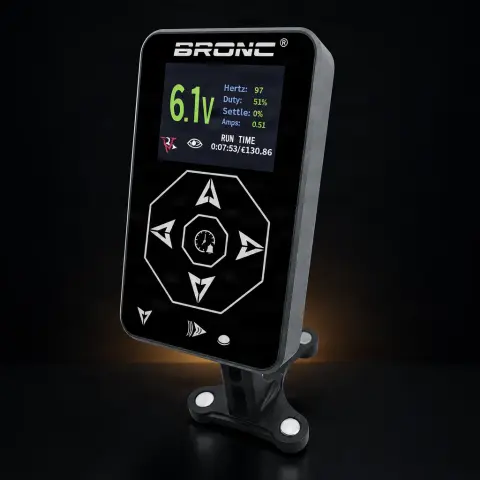
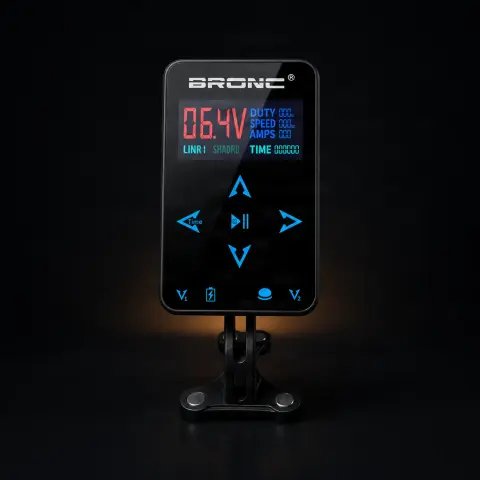
Power Supply Hummingbird Bronc M1 Black

Hummingbird
Cod produs: 376637
577,00 Lei
Fast delivery
Delivery 24-48h
14-day returnsWarrantyDelivery 24-48h
💵 Cash on delivery🔒 Secure order
1

Specifications

Brand
Hummingbird
Motor power
68W
Voltage
3-18V
Color
Black
Compatibility
Clipcord, RCA
Warranty
1 year

Ghiduri utile:Sursa de alimentare pentru tatuaj — ghid pe înțelesPedale și clipcord pentru tatuaj: rol, tipuri și conecticăCritical: surse de alimentare și baterii wireless pentru mașini

Presentation video

Guide & full description

Complete guide: Power Supply Hummingbird Bronc M1 Black

A digital power supply for tattoo machines, with LCD screen, adjustable output voltage between 3 and 18 V and 68 W power. It connects via clipcord or RCA, operates in continuous mode or with a foot pedal, and offers 6 voltage presets plus a session timer. It is a suitable choice for both beginning artists and professionals who want to quickly switch between line and shading settings. The black variant is technically identical to the other colors in the Bronc range — the choice is purely aesthetic.

How to use

  1. Place the power supply on a stable and clean surface in your workstation and cover the panel and cables with disposable protective film (barrier film) before the session.
  2. Connect the adapter to the power outlet — the power supply accepts input voltage of 90–240 V AC at 50/60 Hz, so it works with any standard outlet without an additional transformer.
  3. Connect the tattoo machine to the power supply via clipcord or RCA cable, depending on your machine's connector.
  4. If you prefer foot control, connect the pedal; if not, use continuous operation mode.
  5. Turn on the power supply and adjust the voltage with the +/- buttons, watching the value on the LCD screen. Start with a low value and increase gradually until the machine runs stably, as needed.
  6. To save a preset: press the button where you find the presets, adjust the desired voltage with the +/- buttons, then hold down the preset voltage button for 3 seconds. You have 6 preset slots available.
  7. If you want to track the working time, activate the session timer.
  8. At the end, turn off the power supply, unplug it, discard the protective film, and wipe the touched surfaces with a slightly damp cloth with a compatible surface disinfectant.

Tips from us

  • Save the voltages you use most often in presets — for example, one for lines and one for shading — so you can switch in seconds without readjusting during the session.
  • Check the condition of the clipcord or RCA cable before each session: a worn or poorly contacting cable causes irregular machine operation, no matter how good the power supply is.
  • During work, only touch the buttons over the protective film — any surface touched with work gloves is considered contaminated.
  • The power supply has a single power output, so it powers only one machine at a time. If you work with two machines, manually switch the cable between them or use a second power supply.
  • Keep the power supply away from liquids: clean it only with a slightly damp cloth with a compatible disinfectant, never with aggressive solvents or liquid poured directly on the casing.
  • Store the power supply at room temperature, away from excessive humidity, especially if you transport it frequently between locations.
Warning: The power supply does not come into direct contact with the client's skin, but it is frequently touched during work, so treat it as a contaminable surface: cover the control panel and cables with disposable protective film and replace it after each client. Always unplug the device from the outlet before cleaning and do not pour liquids directly on the casing. Do not open the power supply yourself — it comes with a 1-year warranty, and for any defect contact the seller.

Frequently asked questions

What tattoo machines is the power supply compatible with?

The power supply connects via clipcord or RCA, the two standards used by the vast majority of wired tattoo machines, and the adjustable range of 3–18 V covers the usual working range. Wireless machines are not powered directly from the power supply because they run on their own battery; however, if your wireless model also supports cable mode, you can power it from this power supply via RCA or clipcord, without relying on battery life.

How do I save a preset voltage and then use it?

The power supply has 6 voltage presets. Press the button where you find the presets, adjust the desired voltage with the +/- buttons, then hold down the preset voltage button for 3 seconds to memorize it. Later, during work, you return to the saved voltage directly from the preset, without having to manually adjust it each time — useful when alternating between line and shading settings.

Can I work without a foot pedal?

Yes. The power supply works both in continuous mode and with a foot pedal. In continuous mode, the machine runs as long as the power supply is on, and with the pedal you control start and stop with your foot, which leaves your hands free during work. If you want pedal control, you need a compatible pedal connected to the power supply.

How do I sanitize and maintain the power supply after sessions?

Maintenance is minimal: during work, protect it with disposable film that you change after each client, and after the session wipe it with a slightly damp cloth with a compatible surface disinfectant. Avoid aggressive solvents, which can damage the finish, and do not let liquids enter the casing. Store it at room temperature, away from excessive humidity.

Can I connect two machines at the same time?

No — the power supply has a single power output and is designed to power only one machine at a time. If you work with two machines in the same session (for example, one for lines and one for shading), either manually switch the cable between them or use a second power supply.

What warranty does it have and what do I do if a problem occurs?

The power supply has a 1-year warranty. Keep the proof of purchase, and if any abnormal behavior occurs — unresponsive display, unstable voltage, device not starting — do not attempt to repair or open it yourself, as you will lose the warranty. Contact the seller for diagnosis and resolution. The built-in overload protection reduces the risk of damage in normal use, but does not replace proper handling.

Product description

Power Supply Hummingbird Bronc M13 Amps Input voltage frequency (adapter): 90-240Vac 50/60Hz Input voltage frequency: 50-60HZOutput power: 68WOutput voltage: 3-18V, adjustable output Plastic panel and gold-plated circuit board. It is a source with a beautiful appearance, excellent workmanship and changing the voltage can be done with multi-touch operation. The machine can work continuously or with the help of the pedal.6 voltages preset in L/S can be used for this source. To adjust a preset voltage, press the button where you find all the presets, then adjust the voltage using the +/- keys and then press the preset voltage button for 3 seconds. You can also set a timer for the work session. Warranty: 1 year The Hummingbird Bronc Model 1 Black Digital Power Supply is the professional power supply unit with digital LCD screen in the most requested color variant in the Bronc range, preferred by the majority of tattoo artists for its professional and elegant appearance. Produced by Hummingbird under the Bronc brand, this power supply offers the same top technical specifications as the other color variants: adjustable output voltage of 3-18V DC displayed on the digital LCD screen, maximum power of 68W, and output current of up to 3A with 0.1A precision. The integrated overload protection prevents equipment damage and ensures safety in any situation. The universal input voltage of 90-240V AC at 50/60Hz guarantees global compatibility without requiring an additional transformer. The black housing finish gives the power supply a premium and professional appearance that pairs perfectly with any tattoo setup, from black workstations to mixed equipment configurations. Black is the color that best conceals ink marks and wear, maintaining the power supply's new appearance for a longer period. The standard clipcord and RCA connection ensures universal compatibility with all professional tattoo machines. The ergonomic control buttons on the front panel allow quick and precise voltage adjustments during work sessions. The exceptional quality-to-price ratio and demonstrated reliability make the Bronc Model 1 Black one of the best-selling power supplies in Romania. Frequently Asked Questions What specifications does the Bronc model 1 Black have? The Bronc model 1 Black has adjustable output voltage of 3-18V DC, maximum power of 68W, maximum current of 3A with 0.1A precision, overload protection, digital LCD screen, and universal input voltage of 90-240V AC. Specifications are identical to the white and gray variants. Why is the black variant the most popular? The black variant is the most popular because it universally matches any tattoo setup, excellently conceals ink marks and wear, and gives a professional appearance that inspires client confidence. Most premium tattoo equipment is available in black, facilitating the creation of a unified aesthetic setup. Is it technically identical to the white and gray variants? Yes, all three color variants of the Bronc model 1 are technically identical. The electronic platform, components, performance specifications, and features are absolutely the same. The only difference is the exterior housing color. The color choice is purely aesthetic. How is the Bronc model 1 Black power supply maintained? The Bronc model 1 Black power supply requires minimal maintenance. Regular wiping with a damp cloth and compatible disinfectant after each tattoo session is recommended. Avoid excessive liquid exposure and do not use aggressive solvents that can damage the finish. Store the power supply at room temperature, away from excessive humidity. Can I connect two machines simultaneously to the Bronc power supply? The Bronc model 1 power supply is designed to power a single tattoo machine at a time, having one power output. If you want to use two machines in the same session, you will need to manually switch the cable between machines or purchase a second power supply. Does the Bronc power supply work with wireless machines? The Bronc model 1 power supply does not directly power wireless machines, as these operate on their own battery. However, wireless machines can also be used in wired mode, in which case the Bronc power supply can power them through the RCA or clipcord connection, offering unlimited autonomy compared to battery mode. How compact is the Bronc 1 Black model? The Bronc model 1 Black power supply has compact dimensions that make it easy to integrate into any workspace or transport in an equipment bag. The efficient design maximizes performance in a reduced format, leaving more space on the work table for other instruments needed in the tattooing process. What foot switch do you recommend for the Bronc model 1 power supply? The Bronc model 1 power supply is compatible with any standard tattoo foot switch with jack connection. We recommend foot switches from the tatuat.ro range, which are tested and guaranteed for perfect compatibility. For a compact setup, the round foot switch is an excellent choice, and for superior ergonomics, the trigo foot switch. Can the Bronc power supply power coil machines? Yes, the Bronc model 1 power supply can power coil machines thanks to the voltage range of up to 18V and output power of 68W at 3A. This capacity is sufficient to power any professional coil machine, including more demanding models used for thick lining or rapid fills. Where is the Hummingbird Bronc power supply manufactured? The Hummingbird Bronc power supply is manufactured by Hummingbird, an internationally recognized producer of professional tattoo equipment. The Bronc brand is Hummingbird's subdivision dedicated to power supplies and accessories, offering products tested and certified for professional use in tattoo studios worldwide.

You might also like

Reviews

No reviews yet. Bought this product? Be the first to leave one.

You get 25 points for a review, 50 if you add a photo.