Complete guide: Top transfer sheets A4 UNISTAR for printer (100 pieces)
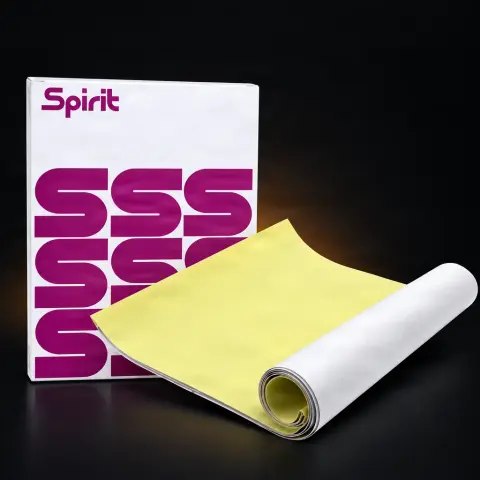
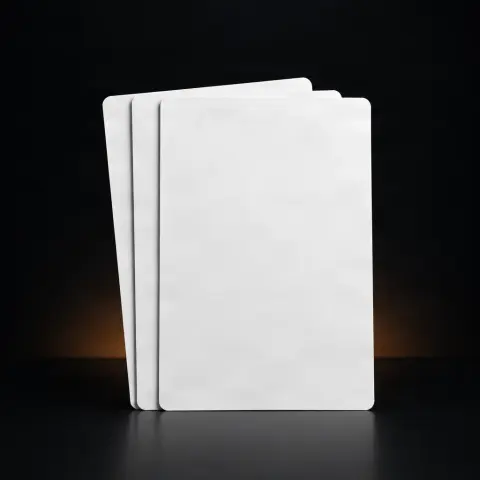
This pack of 100 A4 transfer sheets, Unistar brand, is the essential consumable for creating tattoo stencils — the drawing that guides the artist directly on the client's skin. The sheets have a special pigment layer and are compatible with both thermal stencil printers and manual tracing, making them suitable for any studio, regardless of the preferred working method. A single pack covers, depending on the artist's workload, several weeks or months of activity.
How to use
- Prepare the design: a digital file if using a thermal stencil printer, or a sketch on paper if opting for manual tracing.
- For thermal printing: feed the A4 sheet into the printer following the orientation indicated in the device's manual, so the pigment layer comes out correctly on the right side.
- For manual tracing: place the sheet over the original drawing and trace the lines with a transfer tool (stylus, pen); the pigment layer picks up the traced lines.
- Prepare the client's skin according to the studio's hygiene protocol: clean, degrease, and if necessary, shave the area.
- Apply a thin, even layer of transfer solution (stencil solution/gel) to the skin, which helps the pigment adhere to the skin.
- Place the sheet with the printed/traced side on the prepared area, press evenly for a few seconds without moving it, then carefully peel it off from one corner.
- Check the clarity of the transferred outline before starting the tattoo and correct manually with a surgical marker if needed.
- Dispose of the used sheet after each client as single-use waste, according to the studio's hygiene standards — do not reuse on another person.
Tips from us
- Keep the pack in its original packaging, in a dry and cool place, away from direct light and humidity, so the pigment layer does not activate prematurely.
- If working with a thermal printer, check its manual for the correct sheet feed direction for a clear transfer.
- For small designs, you can cut the A4 sheet to the required size with a cutter or scissors, saving material.
- Test a sheet before an important session, especially if you change the paper batch or the type of transfer solution used.
- Keep a spare pack on hand in the studio so you don't run out of stencils in the middle of a busy day.
Warning: The transfer sheet and the applied solution come into direct contact with the client's skin — use a new, unused sheet for each client or session. Follow the studio's hygiene protocol (skin disinfection, gloves, protective barriers) both when applying the stencil and during tattooing. If a client reports known sensitivity or allergies, discuss the transfer solution used in advance, according to your working practice.
Frequently asked questions
Are Unistar sheets compatible with any thermal stencil printer?▾
They are compatible with the main thermal stencil printers used in tattooing, the A4 format being the standard size accepted by most of these devices. However, we recommend checking your printer's specifications before using them in large volume to confirm exact compatibility.
Can I use the sheets without a thermal printer, just by manual tracing?▾
Yes, the sheets are designed for dual compatibility. For manual tracing, place the sheet over the original drawing and trace the lines with a pen or stylus; the pigment layer picks up the lines and then transfers them to the skin with the help of the transfer solution.
How should I properly store the sheets so they don't lose their quality?▾
Store them in the original packaging, in a dry and cool place, away from direct light and humidity. Avoid heat, which can prematurely activate the pigment layer, and avoid bending or crumpling the sheets.
How long do the 100 sheets in a pack last?▾
It depends on your workload and the complexity of the designs you create. For designs that require multiple attempts to position the stencil, the sheet consumption will be higher than for simple jobs.
Can I cut the sheets to smaller sizes for small designs?▾
Yes, A4 sheets can be cut with a cutter or scissors to the size suitable for the design, saving material. If they are to go through the printer, make sure the feed edge remains straight and clean.
Why do I also need a transfer solution, not just the stencil sheet?▾
The transfer sheet contains the pigment layer that forms the outline, but the transfer to the skin is done with the help of a transfer solution (stencil solution/gel) applied beforehand to the prepared area — this helps the pigment adhere properly and remain visible throughout the session.
Product description
The Unistar Thermal Copier transfer sheet is perfect to reflect your design and to be used with the thermal printer. Perfect for creating extremely accurate and precise prints that look great on the client's skin, capturing every detail and allowing the tattoo artist to work comfortably on their design. Compatible with most thermal printers on the market. Due to the use of an appropriate high-quality transfer layer, the tracing paper is very sensitive to pressure, which guarantees the accuracy of the reflection on the skin of even the most detailed models. The high-quality indigo, once reflected, remains on the skin for a long time and is resistant to abrasion, making it easy to work on the tattoo even during long sessions. The price is for one top
The 100-sheet UNISTAR A4 transfer paper pack is the complete professional solution for creating tattoo stencils, compatible with both thermal printers and manual tracing. Each A4-format sheet offers a generous surface for designs of all sizes, from small and delicate tattoos to large and complex pieces. UNISTAR transfer paper is manufactured with a special pigment layer that produces clear, intense, and well-defined lines on skin, ensuring precise artist guidance during the tattoo session. The superior paper quality guarantees consistent and uniform transfers, without unclear or incomplete areas that could compromise work precision. Dual compatibility with thermal printers and manual tracing offers the artist maximum flexibility: digital designs can be printed directly, while original sketches can be manually traced onto the transfer sheet. The generous 100-sheet set ensures a substantial stock covering a professional studio's needs for an extended period. The sheets are pre-cut to standard A4 size, feed easily into thermal printers, and are handled without difficulty. UNISTAR is a recognized brand in the tattoo industry for its consumable quality, and this transfer paper pack confirms the reputation through consistent performance and professional results. The superior paper quality ensures that each stencil is a faithful reproduction of the original design, without distortions or detail loss. UNISTAR tests each paper batch to guarantee consistency and performance. The protective packaging maintains sheet quality throughout storage. It is an indispensable consumable that directly influences the work quality of any professional tattoo artist.
Frequently Asked Questions Are the sheets compatible with all thermal stencil printers? Yes, UNISTAR A4 transfer sheets are compatible with the main thermal stencil printers used in the tattoo industry, including popular models like Brother Pocket Jet and other standard thermal printers. The A4 format is the universal size accepted by most printers. Check your printer specifications to confirm transfer paper compatibility. Can I use the sheets for manual tracing? Yes, UNISTAR sheets are designed for dual compatibility: thermal printer and manual tracing. For manual tracing, place the sheet over the original design and trace the lines with a pen or transfer instrument. The pigment layer will capture the traced lines and transfer them to skin using an appropriate transfer solution. How clear are the lines transferred to skin? UNISTAR sheets produce clear, intense, and well-defined lines on skin, providing precise guidance for the artist. Transfer quality also depends on the transfer solution used and correct skin preparation. With a quality transfer solution and correct application, lines are visible throughout the session, even on oily or sweaty skin. How many transfer sheets does an artist use per month? Consumption varies depending on workload and design complexity. An artist with an average schedule may consume between 20 and 50 sheets per month. The 100-sheet pack can cover between 2 and 5 months of work for a single artist. For complex designs requiring multiple positioning attempts, consumption may be higher. Can the sheets be cut to smaller sizes? Yes, A4 sheets can be cut to smaller sizes for smaller designs, saving material. Use a cutter or scissors to cut the sheet to the desired size. Make sure the edge feeding into the printer remains straight and clean if cutting sheets before printing. Many artists prefer to print on the full sheet and cut afterwards. How should transfer sheets be properly stored? Transfer sheets should be stored in their original packaging, in a dry and cool place, away from direct light and humidity. Avoid heat exposure that could prematurely activate the pigment layer. Do not fold or crumple sheets as this can affect transfer quality. Keep them on a flat and clean surface. What transfer solution is used with these sheets? UNISTAR sheets are compatible with all popular transfer solutions in the industry: Spirit Stencil, Panthera Forte Baboolina, and other water-based or alcohol-based transfer solutions. Transfer solution choice depends on the artist's preferences and client's skin type. Water-based solutions are gentler, while alcohol-based ones offer faster drying. Are the sheets eco-friendly? UNISTAR pays attention to environmental responsibility in the manufacturing process. The sheets are designed to minimize waste through superior quality that reduces the need for reprinting. Packaging is efficiently designed. For disposal, follow local regulations regarding paper recycling and cosmetic waste. Is it more advantageous to buy the 100-sheet pack than smaller sets? Yes, purchasing the 100-sheet pack offers a significant cost-per-sheet advantage compared to smaller packages. You also have a generous stock that eliminates the risk of running out of sheets in the middle of a busy day. For professional studios, purchasing in larger quantities is always more cost-efficient. What if the transfer doesn't come out clear? If the transfer is not clear, check the following: apply enough transfer solution to skin, press the stencil firmly and evenly, ensure the skin is clean and degreased before application. For thermal printers, check density and temperature settings. If the problem persists, try a new sheet as old or improperly stored sheets may lose quality.