

Bronc power supply socket adapter
BroncSpecifications
- Brand
- Bronc
- Compatibility
- Bronc power supplies
- Cable length
- Practica
- Material
- Wear-resistant
- Protections
- Overload, short circuit, overheating
Useful guides:Sursa de alimentare pentru tatuaj — ghid pe înțelesPedale și clipcord pentru tatuaj: rol, tipuri și conecticăCritical: surse de alimentare și baterii wireless pentru mașini
Guide & full description
Complete guide: Bronc power supply socket adapter
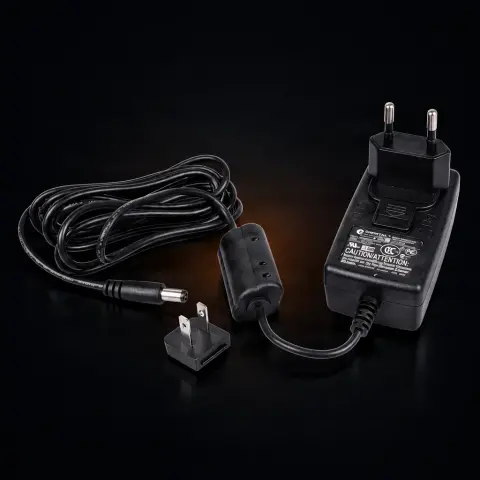
This is a power adapter dedicated to Bronc voltage sources, used with rotary tattoo machines and for PMU. It connects the wall outlet to your power supply, ensuring a firm connection and stable power — the basic condition for constant machine speed and, implicitly, clean lines and even shading. It is the natural choice when the original adapter is damaged or lost, but also a useful spare part in any studio working with Bronc equipment.
How to use
- Before each use, visually inspect the cable, insulation, and connectors — do not use the adapter if you notice cuts, cracks, or loose contacts.
- With the voltage source turned off, connect the adapter's plug to the Bronc power supply; the connection must be firm, without play.
- Insert the plug into the wall outlet — the adapter works on the standard network in Romania and Europe (220–240V, 50Hz, type F/Schuko socket), without additional adapters.
- Position the cable so that it is not stretched, crushed, or caught in high-traffic areas of the studio.
- Turn on the voltage source and adjust the working voltage for your machine, as usual.
- During the session, leave the adapter in a ventilated place; slight warming during operation is normal.
- At the end, turn off the power supply and unplug the adapter by grasping the plug, never pulling the cable.
- Store it with the cable coiled in a wide loop, in a dry place, away from liquids and impacts.
Tips from us
- Keep a spare adapter in the studio: if the main one fails in the middle of a busy day, you can continue working immediately without canceling appointments.
- If the machine has speed variations or interruptions, first check the entire power chain (outlet, adapter, connection to the power supply) before suspecting the machine.
- Do not replace the dedicated adapter with a generic one: incorrect electrical parameters can affect performance and damage the Bronc power supply electronics.
- Keep the power supply (adapter, source, cables) outside the work area, away from ink, disinfectants, and any liquids.
- Do not wrap the cable tightly around the adapter when storing — repeated bends at the same point are the main cause of cable failure.
- Periodically check the connectors and insulation; a loose contact manifests as intermittent interruptions that are hard to diagnose.
Frequently asked questions
What equipment is this adapter compatible with?▾
It is specifically designed for Bronc voltage sources, used with rotary tattoo machines and for PMU in this range. The connector and electrical parameters are calibrated for Bronc equipment, so for power supplies of other brands, choose the adapter dedicated to those — it is not a universal accessory.
Does it work with standard outlets in Romania?▾
Yes. The adapter is compatible with the standard electrical network in Romania and Europe (220–240V, 50Hz) and connects directly to the type F/Schuko socket, without additional adapters.
Can I use a generic adapter instead of this one?▾
It is not recommended. An adapter with unsuitable electrical specifications can provide inadequate voltage or current, which affects machine performance and can damage the Bronc power supply electronics. The dedicated adapter guarantees correct power parameters, and the difference is directly visible in speed stability and line consistency.
Is it normal for the adapter to heat up during work?▾
Slight warming during normal operation is natural and does not indicate a problem. The adapter has integrated overheating protection, which automatically cuts off power if the temperature exceeds safe limits. Still, help it: do not cover it or keep it next to heat sources.
How do I maintain it and keep hygiene around it in the studio?▾
Never pull the cable to unplug it, avoid tight bends, and store the cable in a wide loop in a dry place. Do not expose it to moisture, ink, or sprayed disinfectants — wipe the casing only when unplugged, with a dry or barely damp cloth. During the procedure, do not handle it with work gloves: the power supply remains in the clean zone of the station, and frequently touched areas are protected with disposable barriers.
What do I do if the adapter no longer powers the power supply?▾
First check the outlet (try another one), then inspect the cable and connectors for damage or play in the plug. If the insulation is cracked or the contact is unreliable, replace the adapter — improvised repair of power equipment is a safety risk. Exactly for such situations, it is worth having a spare adapter in the studio.
Product description
📋1 person has it in a list
You might also like
Reviews
No reviews yet. Bought this product? Be the first to leave one.