Complete guide: Inkmachines nr. 23 - Connecting pin - 1pcs
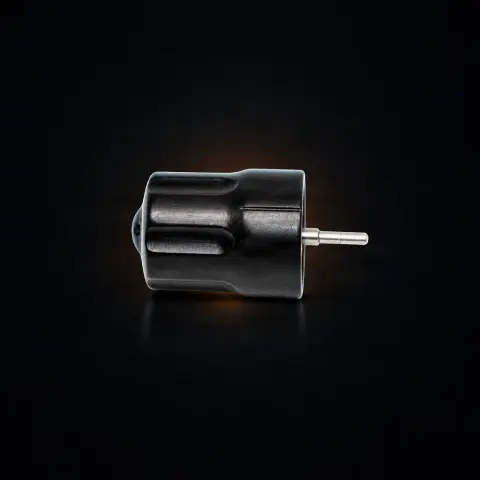
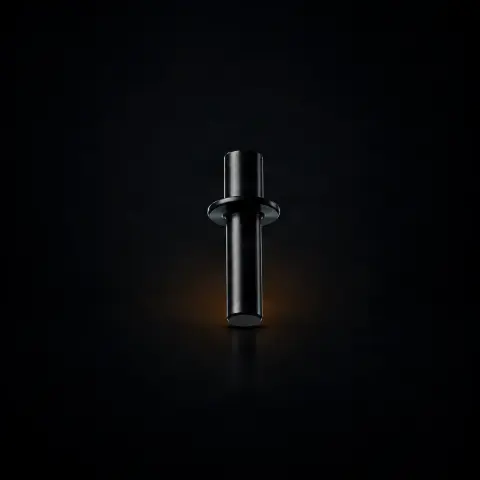
Connection pin no. 23 is the original spare part that ensures the mechanical link between the eccentric system and the piston, inside the InkMachines Dragonfly X2 rotary machine. It is a critical transmission component: it converts the motor's rotation into the linear motion that drives the needle, so without it the machine does not work. It is intended for artists and studios who maintain their own equipment or who want to have a spare part on hand.
How to use
- First confirm that the pin really needs to be replaced: look for play in the joint, metallic noise at low speed, or visible wear marks on the pin surface.
- Turn off and disconnect the machine from the power supply, then prepare a clean, well-lit workspace with a small tray for the small parts.
- Disassemble the drive mechanism of the Dragonfly X2 machine, according to the internal structure, to access the pin.
- Remove the retaining ring using the ring pliers no. 55 (separate part, required for this operation).
- After removing the ring, push out the old pin with the long end of an Allen key, as recommended by the manufacturer.
- Install the new original pin no. 23 in the same position, then reassemble the retaining ring and the rest of the mechanism.
- Apply a small amount of tattoo machine-specific oil to the joint point and start the machine at low speed to check for smooth operation.
- Check that there is no more play or noise before using the machine on a client.
Tips from us
- You also need the ring pliers no. 55 to remove and reassemble the retaining ring — order it together with the pin if you don't already have it.
- Being a mechanically stressed part, it's worth keeping a spare pin in the studio so you don't get stuck in the middle of a session.
- Periodically lubricate the joint with oil dedicated to tattoo machines; regular lubrication reduces friction and prevents premature wear.
- Replace the pin preventively at the first signs of fatigue, don't wait for it to break — a break can also damage neighboring components through uncontrolled movements.
- Always check compatibility with your model before ordering: pin no. 23 is specified for Dragonfly X2, and other InkMachines models may use parts with different dimensions.
Warning: Always disconnect the machine from the power supply before disassembling it and handle small parts carefully, without forcing them. The connection pin is an internal component and does not come into contact with the skin, but the machine as a whole must always be used with appropriate protective barriers (film on the machine body and on the clip cord) during work. After any internal intervention, test the machine empty before tattooing a client. If you are not experienced with the internal structure of the machine, contact an authorized service center.
Frequently asked questions
Which machine is the connection pin no. 23 compatible with?▾
Connection pin no. 23 is specified by the manufacturer as an original spare part for the InkMachines Dragonfly X2 rotary machine. Each InkMachines model may use components with different dimensions and specifications, so for any other model first check compatibility with the manufacturer or authorized distributor before ordering.
How do I know the pin needs to be replaced?▾
Typical signs of wear are perceptible play in the joint (lateral movement), metallic noise at low speeds, inconsistent needle movement, and visible wear marks on the pin surface. Any play is amplified through the mechanism and affects precision, so at these signs the pin must be replaced.
What other tools do I need to replace it?▾
You need the ring pliers no. 55 to remove and reassemble the retaining ring, plus an Allen key — the manufacturer recommends pushing out the old pin with the long end of the Allen key after removing the ring.
Does the pin require lubrication?▾
Yes. Periodic lubrication of the joint, with tattoo machine-specific oil applied in a controlled amount, reduces friction, prevents premature wear, and maintains smooth movement of the mechanism.
What is it made of and how long does it last?▾
The original pin no. 23 is made from high-strength heat-treated steel, chosen to withstand the intense stresses from each needle stroke. The lifespan depends on the intensity of use, the quality of lubrication, and the general maintenance of the machine; for intensive professional use, periodic inspection and replacement at signs of wear are recommended.
Can I replace it myself?▾
Replacement involves disassembling the machine's drive mechanism, so it is a medium-difficulty operation that requires knowledge of the internal structure and appropriate tools. Artists experienced in maintenance can do it themselves; if you do not have this experience, it is safer to contact an authorized service center.
Product description
Inkmachines nr. 23 - Connecting pin Note that you will also need the No. 55 - Circlip pliers to replace this part. Hint! After removing the Circlip you can use the long end of an allen key to push the Connecting pin out.
Connecting pin for InkMachines Dragonfly X2 tattoo machine, original spare part no. 23, 1 piece. The connecting pin is an essential mechanical component that provides the physical link between two elements of the Dragonfly X2 drive mechanism. This part transmits motion from the eccentric system to the piston, making possible the transformation of motor rotation into linear tattoo needle movement. Manufactured from high-strength heat-treated steel, the connecting pin withstands considerable forces with each needle stroke, material fatigue resistance being essential for durability. Precision dimensions ensure exact fit without play that could compromise mechanical transmission efficiency. The InkMachines Dragonfly X2 is one of the most reliable and high-performing rotary tattoo machines available, used by professional artists worldwide. The connecting pin should be replaced when visible wear, joint play, or deformation is observed. A worn pin causes mechanical efficiency losses and imprecise needle movement. Original InkMachines part priced at approximately 5 EUR, with quality and dimensions guaranteed by the Swedish manufacturer. Efficient mechanical transmission is the foundation of any rotary tattoo machine's performance. The original InkMachines connecting pin ensures every unit of motor energy reaches the tattoo needle without losses. Available on tatuat.ro with fast delivery and Swedish InkMachines manufacturer guarantee. Every component in the mechanical chain matters, and the connecting pin is no exception to this fundamental engineering principle.
Frequently Asked Questions What does pin no. 23 connect in the Dragonfly X2 mechanism? Connecting pin no. 23 provides the mechanical link between the eccentric system and piston, transmitting motor rotational motion and transforming it into the linear motion needed for tattoo needle actuation. It is a critical transmission component without which the machine cannot function. How much does connecting pin no. 23 cost? InkMachines connecting pin no. 23 is available at approximately 5 EUR. It is a moderate but essential investment, as the connecting pin is one of the most mechanically stressed components in the entire Dragonfly X2 machine mechanism. How do I know the connecting pin needs replacing? Signs of wear include: play in the joint perceived as lateral movement, metallic noise at low speeds, inconsistent needle movement, or visible wear marks on the pin surface. Any play in the connecting pin joint is amplified through the mechanism and affects tattoo precision. Does the connecting pin need lubrication? Yes, periodic lubrication of the connecting pin reduces friction and extends the part's lifespan. Use tattoo machine-specific oil applied in controlled quantity at the articulation points. Regular lubrication prevents premature wear and maintains smooth mechanism operation. What happens if the connecting pin breaks? Breaking of the connecting pin completely stops machine operation as the motion transmission is interrupted. Additionally, breaking can cause damage to adjacent components through uncontrolled movements. If you observe signs of fatigue or advanced wear, preventively replace the pin before it reaches the breaking point. Is the connecting pin an easy part to replace? Replacing the connecting pin requires disassembly of the Dragonfly X2 drive mechanism, which is a medium-difficulty operation. Knowledge of the machine's internal structure and use of appropriate tools is necessary. Artists experienced in maintenance can perform the replacement, but for others we recommend authorized service. How often should the connecting pin be replaced? The connecting pin is a durable but intensely stressed component. For intensive professional use, annual checking and replacement at signs of wear is recommended. Lifespan depends on usage intensity, lubrication quality, and overall machine maintenance conditions. Is the connecting pin compatible with the Stingray X2? Connecting pin no. 23 is specified for the Dragonfly X2 machine. Each InkMachines model may use components with different dimensions and specifications. Verify compatibility with the manufacturer or authorized distributor tatuat.ro before ordering parts for another model. What material is used for the connecting pin? InkMachines connecting pin no. 23 is manufactured from high-strength steel with heat treatment that gives it hardness and mechanical fatigue resistance. The material is selected to withstand hundreds of thousands of loading cycles without deformation or breaking, ensuring long-term reliability. Does a worn connecting pin affect needle stroke? Yes, a worn connecting pin with joint play reduces mechanical transmission efficiency and can modify the effective needle stroke. Joint play translates into loss of part of the eccentric stroke, resulting in shallower and inconsistent penetration. Replacing the pin restores the stroke to its nominal value.