

Switch Critical
CriticalSpecifications
- Brand
- Critical
- Weight
- 87 g
- Height
- 0.8"
- Compatibility
- All tattoo power supplies
- Operation
- Single button
- Function
- Constant power flow
- Size
- Compact
- Warranty
- 1 year
Useful guides:Sursa de alimentare pentru tatuaj — ghid pe înțelesPedale și clipcord pentru tatuaj: rol, tipuri și conecticăCritical: surse de alimentare și baterii wireless pentru mașini
Presentation video
Guide & full description
Complete guide: Switch Critical
Switch Critical is a handheld pedal-free switch, dedicated exclusively to the Critical Tattoo power supply ecosystem (including the CXP model and previous generations with a dedicated switch port). Essentially, it replaces or complements the foot pedal: with a single button you turn the power on or off, or switch between power supply modes, without moving your attention from the work area. It is especially useful for artists who work in positions where the foot pedal is uncomfortable (e.g., arms, client lying down) or who want quick, hand-held control. Being a reusable accessory, not a consumable, it is designed for daily, repeated use in a professional studio.
How to use
- Before purchasing, check that your Critical power supply has the dedicated switch port (the CXP model and most earlier Critical generations have it).
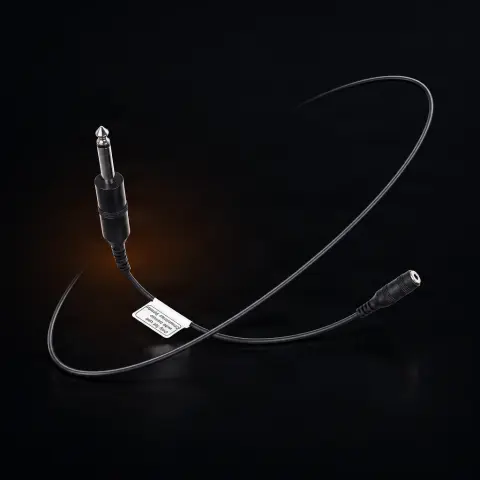
- Connect the dedicated cable (included with the switch) to the specific port on the back or side of the power supply — the connection is plug-and-play, no software installation required.
- If your power supply requires it, select the appropriate switch operation mode (on/off or mode switching) from the power supply's own menu — consult your power supply's manual for the exact steps for your model.
- Position the switch within hand's reach, on the work table or near the area where you hold your free hand during the session.
- Press the single button to control the power — one action, without having to search for the foot pedal.
- At the end of the session, turn off the power supply before touching the switch for cleaning.
- Sanitize the switch casing according to your studio's protocol before the next client.
Tips from us
- Confirm exact compatibility with your Critical power supply model (CXP or earlier generation with dedicated port) before ordering — the connector is Critical proprietary and does not work with power supplies from other brands.
- If you frequently tattoo in positions where the foot pedal is uncomfortable, a handheld switch can reduce downtime in the session.
- Keep the connecting cable away from the work area with needles and ink to avoid premature wear from pulling or twisting.
- Check the integrity of the cable and button from time to time, especially if the studio has a high client volume.
- Store the switch in a dry place between uses, like any electronic accessory.
- If you are not sure which mode should be selected for correct switch operation, consult your Critical power supply's manual.
Frequently asked questions
Which power supplies is the 'Switch Critical' compatible with?▾
It is exclusively compatible with Critical Tattoo power supplies that have the dedicated switch port — including the CXP model and earlier Critical generations with this port. It does not work with power supplies from other brands (e.g., Cheyenne or FK Irons) because it uses a Critical proprietary connector. If you are not sure that your power supply has the dedicated port, check your model's specifications before ordering.
What exactly does the switch do — does it replace the foot pedal?▾
The switch is a quick power control button: it turns the power supply on or off, or switches between operating modes, depending on the model and the configuration set in the power supply's menu. It can work as an alternative to the foot pedal — especially useful when you work in positions where the foot pedal is inconvenient to access (e.g., tattoos on the arm, with the client lying down) and you prefer hand-held control.
How is the switch connected to the power supply?▾
Via the included dedicated cable, which is plugged into the specific port on the back or side of the Critical power supply — plug-and-play connection, no software. Some power supply models may require selecting the switch operating mode directly from the power supply's menu; check your model's manual for exact steps.
How do I clean and maintain it between clients?▾
Being a reusable electrical accessory, do not immerse it in liquids and avoid direct spraying in the connector area — wipe the casing with a suitable disinfectant for electronic surfaces, just like any other equipment in the work area. Periodically check the cable for signs of wear, especially if you use it daily in a high-volume studio.
Does the switch work with any Critical power supply, regardless of age?▾
It works with Critical power supplies that have the dedicated switch port — the CXP model has it, as do most earlier Critical generations. If you have an older Critical power supply or are not sure it has this port, check your model's specifications before ordering the switch to avoid an incompatible purchase.
Is it worth buying if I already use the foot pedal without issues?▾
It depends on your workflow. If the foot pedal works well for you, the switch is more of an optional upgrade, not a necessity. It makes sense especially if you want a hand-held alternative, work in positions where the foot pedal is uncomfortable, or want to free up floor space around the chair.
Product description
👁3 people viewed it this week
You might also like
Reviews
No reviews yet. Bought this product? Be the first to leave one.