Skip to content
TATUAT.ROCREATE THE BEST, WE SUPPLY THE REST
tatuat.ro

Also in:RomânăMagyar

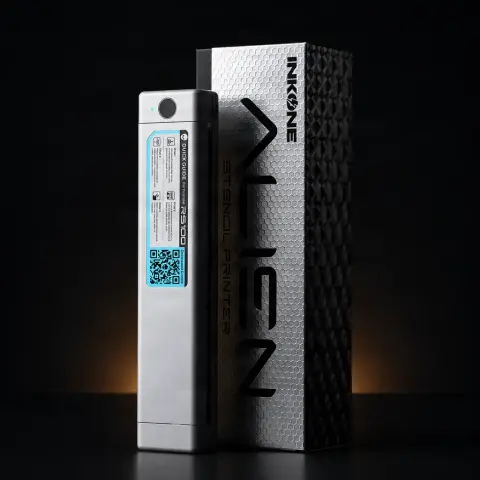
InkOne Wireless Thermal Printer for Stencil Paper

InkOne
Product code: 4724653
870,00 Lei
Fast delivery
Delivery 24-48h
14-day returnsWarrantyDelivery 24-48h
💵 Cash on delivery🔒 Secure order
1

Specifications

Brand
InkOne
Product type
Wireless thermal printer for stencil paper
Connectivity
Bluetooth
Device compatibility
iOS and Android (compatible devices)
Printing type
Thermal, no ink or toner required
Power
Rechargeable battery
Package contents
Printer, USB charging cable, user manual
Technology
Thermal printing
Compatibility
iOS and Android
Consumables
Compatible thermal stencil paper

Useful guides:Imprimanta de stencil (thermal) — cum funcționeazăFoile de transfer pentru stencil: termică vs hectografică — cum alegiHârtie de transfer termică vs hectografică — cum scoți stencilul

Guide & full description

Complete guide: InkOne Wireless Thermal Printer for Stencil Paper

The InkOne wireless thermal printer turns a digital design into a stencil ready for transfer, without the need for ink or toner. Use it when you want to go straight from the design prepared on your phone or tablet to the stencil paper, skipping the manual tracing step.

How to use

  1. Turn on the printer and activate the Bluetooth connection.
  2. Open the app indicated in the product manual and select the desired design.
  3. Adjust the size, position, and orientation of the design in the app, if the app version allows this.
  4. Correctly load the thermal stencil paper into the printer.
  5. Start printing and wait for the transfer onto the paper to finish.
  6. Apply the stencil onto the skin using the transfer solution suited to your workflow.

Tips from us

  • Check the battery level before heading to a convention or working while traveling, to avoid interruptions.
  • Use only compatible thermal stencil paper, as recommended by the manufacturer, for a clear print.
  • If the app or connection steps differ from what you used before, check the manual or the QR code in the package for the correct version.
  • Prepare and check the design in the app before printing, to avoid unnecessary stencil paper use.
Warning: Use only thermal stencil paper compatible with the printer. Keep the printer and the charging cable dry and clean, and charge the battery according to the manual's instructions, for the safety of the equipment.

Frequently asked questions

Do I need ink or toner for this model?▾

No, printing is thermal and only uses compatible thermal stencil paper, with no ink or toner required.

What devices can I connect to the printer?▾

Phones or tablets compatible with iOS or Android, connected via Bluetooth.

Can I use the printer outside the studio?▾

Yes, being portable and powered by a rechargeable battery, it can also be used at conventions or while traveling.

Is the connection app always the same?▾

The app name and steps may vary depending on the printer version, so it is recommended to follow the manual or the QR code in the package.

What stencil paper should I use?▾

Thermal stencil paper compatible with this type of printer, according to the manufacturer's instructions.

Product description

The InkOne wireless thermal printer was designed for tattoo artists who want to quickly move from a digital design to a stencil ready to apply on the skin. It requires no cartridges, ink, or toner — printing is done thermally, directly onto compatible stencil paper.

Who it's useful for

It is aimed at tattoo artists and studios who frequently work with digitally prepared designs and who want to eliminate manual tracing of stencils. Being portable, thanks to its rechargeable battery, it can be used both in the studio and at conventions or while traveling.

How it fits into your workflow

Connection is wireless, via Bluetooth, from a phone or tablet compatible with iOS or Android. The design is prepared and sent from the dedicated app, where you can adjust the size, position, and orientation of the design, depending on the app version. Once the design is set, the printer transfers it directly onto the thermal stencil paper, ready for application on the skin with the transfer solution you normally use.

What's in the package

  • InkOne wireless thermal printer
  • USB charging cable
  • User manual

For proper results, the manufacturer recommends using compatible thermal stencil paper. The name of the app and the exact connection steps may vary depending on the printer version, which is why it is advisable to follow the manual or the QR code included in the package.

4 people viewed it this week

You might also like
Reviews

No reviews yet. Bought this product? Be the first to leave one.

Earn RON 2.50 for a review, or RON 5 with a photo.